Your H5P lessons can listen now.
Students say the answer instead of typing it. Then they read the whole sentence aloud and see which sounds to practise.
The lessons stay exactly as they are. Nothing is rebuilt.
- Works on the Fill in the Blanks and Multiple Choice activities you already have.
- Results go to the Moodle gradebook and the teacher's attempt report.
- Runs on an open speech model, so there is no per-minute vendor fee.
Press a microphone button and speak. Your browser asks for the microphone once. Audio is scored and then discarded; nothing is stored.
What the LMS receives
Answer and press Check. Each result appears here as Moodle records it.
What the teacher sees in Moodle
This is Moodle's own attempt report, from a test run of the same two activities in Moodle 4.5. The add-on adds the read-aloud results to the student's attempt. The grade still comes from the activity itself.
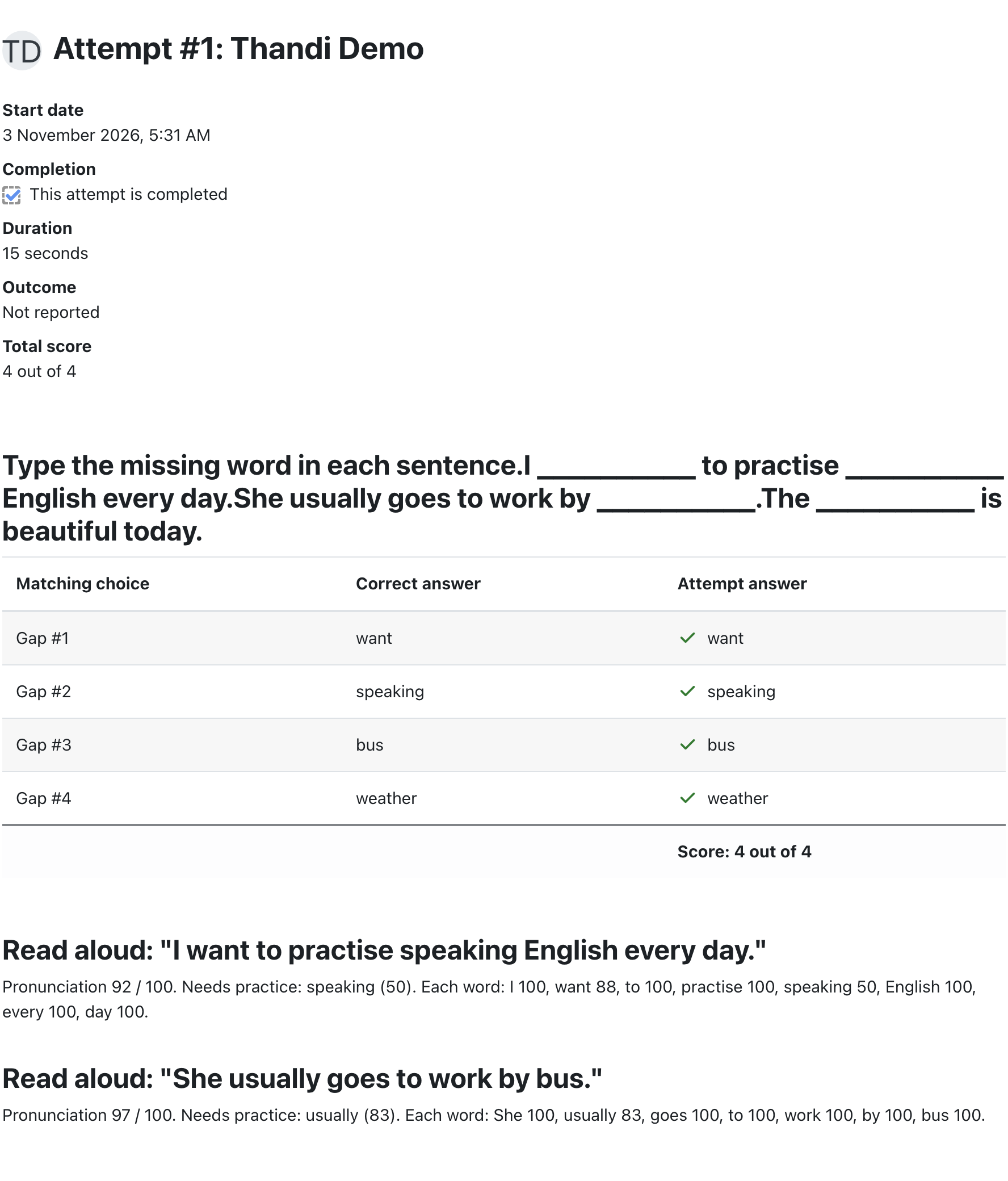
- The grade stays honest
- Spoken answers fill the same blanks a student would type. The gradebook gets the activity's normal score.
- Pronunciation is kept with the attempt
- Each read-aloud result is stored under that attempt, with a score for every word.
- Whether it counts is your choice
- Today pronunciation is feedback and does not change the grade. If you want it to count, that rule is agreed and built in the first stage of the work.
How it reaches lessons you already have
H5P has a built-in way to extend content: add-on libraries. The add-on is installed once, like a new content type, and it attaches itself to existing activities when they open.
Install once
An administrator uploads one add-on file in Moodle. The install also refreshes Moodle's cached lesson data once, so existing lessons pick the add-on up.
Lessons gain the microphone
Existing Fill in the Blanks and Multiple Choice activities show the speaking controls the next time they open.
Results reach Moodle
Answers and read-aloud results travel through H5P's normal reporting into the gradebook and attempt report.
What it checks today, and what comes next
Checks now
- Which answer the student said, out of the activity's own options.
- Each sound in each word, with British and American forms both accepted.
- A wrong answer is turned down, not forced onto the closest option.
Not yet
- Rhythm, stress and intonation are not scored.
- Very close sounds in a single word, like ship and sheep, are not told apart reliably yet. Thresholds are tuned on synthetic voices. Real learner recordings come first in the paid work.
- Other activity types (Course Presentation, Interactive Video) need their own small adapter.
- Tested in Chrome's engine (Chrome and Edge). Safari and Firefox are checked in the first stage of the work.